Driver Manager Status File
The Driver Manager Status file provides a detailed snapshot of the current driver configuration and runtime status. This information is useful for monitoring, debugging, and verifying driver operation.
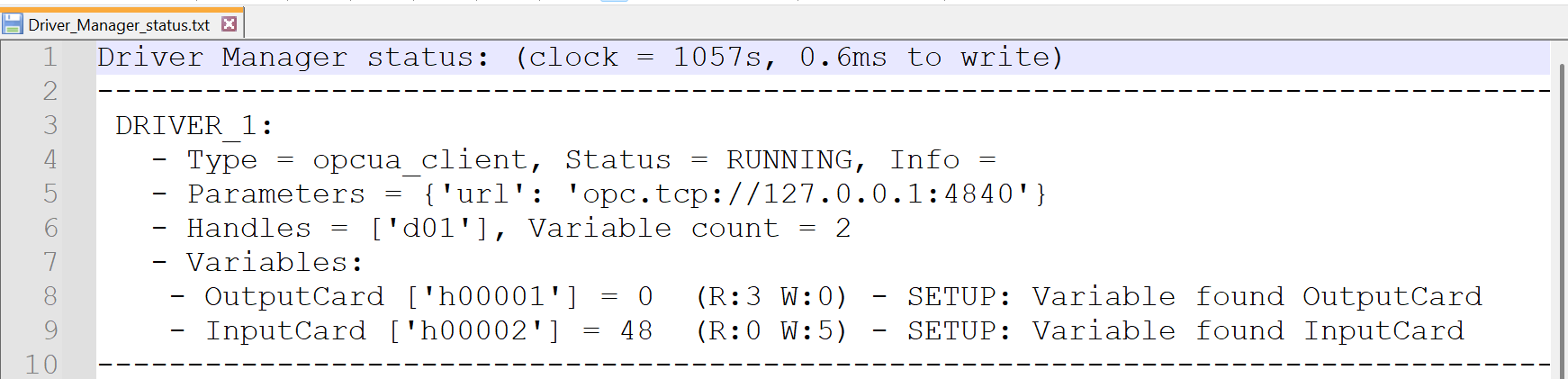
The file includes the following data:
- Driver Type: Specifies the driver interface in use (e.g.,
opcua_client). - Driver Status: Indicates the current state of the driver (
RUNNING,STOPPED,ERROR). - Parameters: Displays driver-specific configuration parameters (e.g., OPC UA server URL).
- Handles: Lists the internal handle identifiers assigned to the driver.
- Variable Count: Total number of variables managed by the driver.
- Variables: Detailed list of each variable including:
- Variable identifier (e.g.,
h00001) - Current value
- Access rights (
R:x W:y) - Setup status and assigned variable name
- Variable identifier (e.g.,
Example
In the example, the driver type is opcua_client, the status is RUNNING, and the OPC UA server endpoint is opc.tcp://127.0.0.1:4840. Two variables are listed: OutputCard and InputCard, along with their respective handles, current values, and access configurations.
File Location
The Driver Manager Status File is located at: C:\Users\yourusername\Simumatik\gateway
Replace yourusername with your actual Windows user profile name.
The file is typically named Driver_Manager_status.text. You can open this file in Visual Studio Code (VS Code) for instant update.